
Pick the Uiosmuph or the KANMABPC for a slim mouse that slides into a laptop bag, the MELOGAGA or the KANMABPC if you need Bluetooth as well as a USB receiver, and the LuLabboard or the Lacolain for six buttons and three stated DPI levels. All five are rechargeable wireless mice with LED lighting, so the differences are connection mode, body size, button count, and sleep and charging behavior.
The five split into two shapes. The Uiosmuph and the KANMABPC are flat, travel-sized mice at 4.4 inches long, while the MELOGAGA is the longest and tallest body here at 5.12 inches long and 1.5 inches high. The LuLabboard and the Lacolain are gaming shapes with six buttons each, but neither states dimensions, so fit is judged from weight and button layout.
As an Amazon Associate, we earn from qualifying purchases.


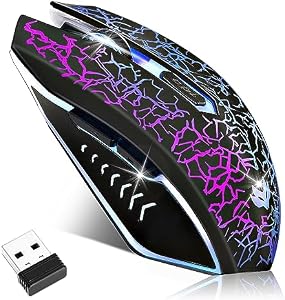


Pick by Your Need
- Best overall: MELOGAGA Wireless Gaming Mouse. Dual Bluetooth and 2.4G modes cover the widest device range here.
- Best for travel: Uiosmuph G12 Slim Mouse. At 0.15 pounds, it is the lightest stated weight and built for a laptop bag.
- Best for Bluetooth: KANMABPC Dual Mode Mouse. Bluetooth 5.2 plus 2.4G in a 4.4-inch body.
- Best for gaming buttons: LuLabboard Wireless Gaming Mouse. Six silent click buttons and a top stated DPI of 2400.
- Best for long stretches between charges: Lacolain Wireless Gaming Mouse. Over 21 days per full charge, with charging during use.
Quick Answer
For most buyers, the MELOGAGA is the safest starting point because its dual mode works across laptops, tablets, and phones as the listing describes. Choose the Uiosmuph if low weight and a slim 0.79-inch profile matter more than Bluetooth, and the LuLabboard for the highest stated DPI here, 2400.
Comparison Table
| Product | Best for | Key stated figure | Trade-off | Buy |
|---|---|---|---|---|
| Uiosmuph G12 Slim Mouse | Travel and laptop bags | 4.4 x 2.2 x 0.79 inches; 0.15 pounds | 2.4GHz receiver only, no Bluetooth stated | View on Amazon |
| MELOGAGA Wireless Gaming Mouse | Switching between devices | 5.12 x 2.44 x 1.5 inches; 0.22 pounds | Largest and heaviest stated body here | View on Amazon |
| LuLabboard Wireless Gaming Mouse | Higher DPI gaming | 3 DPI levels: 2400, 1600, 1200; 0.2 pounds | No body dimensions stated | View on Amazon |
| Lacolain Wireless Gaming Mouse | Charging while you play | 3 DPI levels: 800, 1200, 1600; 0.2 pounds | No body dimensions stated | View on Amazon |
| KANMABPC Dual Mode Mouse | Bluetooth in a slim body | 4.4 x 2.3 x 1.1 inches; Bluetooth 5.2 | No weight stated |
Decision Guide
Start with connection mode. If you need Bluetooth, choose the MELOGAGA or the KANMABPC, the two listings that state Bluetooth alongside the 2.4G receiver mode. If every device has a USB port for a receiver, the other three cover you, and the LuLabboard and Lacolain both state a working distance of up to 10 meters, also given as 33 feet.
Next, match the body to where the mouse will live. For daily travel, choose the Uiosmuph at 4.4 x 2.2 x 0.79 inches or the KANMABPC at 4.4 x 2.3 x 1.1 inches, both described as slim shapes for a laptop bag. For a taller desk body, choose the MELOGAGA, whose stated height of 1.5 inches is the tallest measured profile here.
Then look at cursor speed and buttons. For the highest stated top DPI, choose the LuLabboard at 2400, with 1600 and 1200 below it. For a lower starting point, choose the Lacolain, at 800, 1200, and 1600. Both gaming mice state six buttons; the other three state no count beyond the left and right buttons. Check the product page for current details before ordering.
Finally, weigh sleep and charging. The KANMABPC sleeps after 5 minutes idle, the Uiosmuph after 8, and the MELOGAGA after 10. The Lacolain states over 21 days per charge; the KANMABPC states 7 to 15 days from a 2-hour charge.
1. Uiosmuph G12 Slim Rechargeable Mouse — Best for travel

The Uiosmuph is the slimmest and lightest stated option here, at about 4.4 x 2.2 x 0.79 inches and 0.15 pounds, sized to slip into a laptop bag. Its LED light cycles through 7 different colors while in use, and a switch on the bottom turns the light off. It connects by 2.4GHz through a USB receiver, charges over USB C, states a 1600 figure in its optical description, and sleeps after 8 minutes idle. Against the KANMABPC, it is thinner, but it gives up Bluetooth entirely.
Pros
- Slimmest stated profile here at 0.79 inches high, and the lightest stated weight, 0.15 pounds
- Bottom light switch turns the 7-color LED off, as the listing states
- USB C charging with a built-in rechargeable battery
Cons
- No Bluetooth is stated, so a free USB port for the receiver is required
- Sleep mode starts after 8 minutes idle, sooner than the MELOGAGA’s 10 minutes
| Spec | From the listing |
|---|---|
| Color | Matte Black |
| Size | 4.4L x 2.22W inches |
| Width | 2.25 inches |
| Height | 0.04 inches |
| Weight | 0.15 pounds |
2. MELOGAGA Wireless Gaming Mouse — Best overall

The MELOGAGA pairs Bluetooth and 2.4G dual mode with the largest stated body here: 5.12 inches long, 2.44 inches wide, and 1.5 inches high, at 0.22 pounds, the longest, tallest, and heaviest stated mouse of the five. Its 7-color RGB backlight cycles automatically and turns off in sleep mode, which begins after 10 minutes idle, the longest stated delay in this group. The listing states 3 DPI levels but does not state the values, and it states the mouse works with laptop, PC, Mac, Chromebook, iPad, and iPhone.
Pros
- Bluetooth and 2.4G dual mode switch instantly, with no driver needed, as the listing states
- The listing states silent switches on both left and right buttons
- Charge indicator light beside the wheel shows when charging is complete
Cons
- Heaviest and largest stated body here at 0.22 pounds and 5.12 inches long
- The three DPI levels are stated without values, so cursor speeds cannot be compared
| Spec | From the listing |
|---|---|
| Color | Black |
| Length | 5.12 inches |
| Width | 2.44 inches |
| Height | 1.5 inches |
| Weight | 0.22 pounds |
3. LuLabboard Wireless Gaming Mouse — Best for gaming buttons
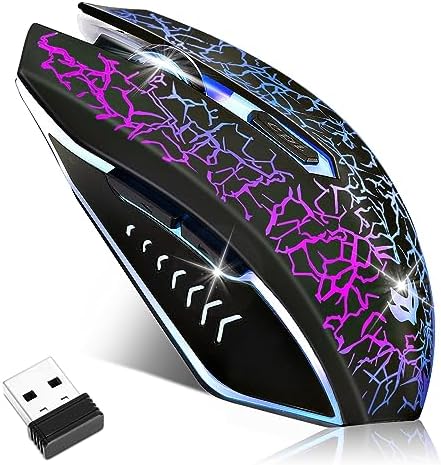
The LuLabboard states the highest top DPI here, with 3 levels of 2400, 1600, and 1200 changed by pressing the DPI button, paired with 6 silent click buttons, the joint-highest count here. It connects over 2.4G through a USB receiver with a stated working distance of up to 10 meters, given as 33 feet, and its listing describes a flowing rainbow backlight. It weighs 0.2 pounds, level with the Lacolain, but states no dimensions, so its grip size cannot be checked here. Skip it if you need Bluetooth, because only the 2.4G receiver connection is stated.
Pros
- Highest stated top DPI at 2400, with 1600 and 1200 below it
- 6 silent click buttons for extra commands, as the listing states
- Stated working distance of up to 10 meters, or 33 feet
Cons
- No body dimensions are stated, so its size cannot be compared with the measured listings
- No Bluetooth is stated, so the receiver is the only connection route
| Spec | From the listing |
|---|---|
| Color | BLack |
| Size | Lightweight |
| Weight | 0.2 pounds |
| Length | The listing does not state it |
| Width | The listing does not state it |
| Height | The listing does not state it |
4. Lacolain Wireless Gaming Mouse — Best for long stretches between charges

The Lacolain leads on stated time between charges: a single full charge lasts over 21 days, and its Type-C charging is stated to charge 50 percent faster than standard mice and to support charging while in use. Its 3 DPI levels run lower than the LuLabboard’s, at 800, 1200, and 1600, for buyers who want a slower starting point. It states 6 customizable buttons and a 2.4GHz connection with a stated range of up to 33 feet, given as 10 meters. Like the LuLabboard, it weighs 0.2 pounds and states no body dimensions, and its listing states no LED color count, so its lighting cannot be compared with the 7-color listings.
Pros
- Longest stated run on a full charge at over 21 days
- Type-C charging works while the mouse is in use, as the listing states
- 6 customizable buttons, with the receiver stored in a slot at the bottom
Cons
- No body dimensions are stated, so fit cannot be checked against the measured mice
- Lower stated top DPI than the LuLabboard, at 1600 against 2400
| Spec | From the listing |
|---|---|
| Color | Black |
| Size | Middle |
| Weight | 0.2 pounds |
| Length | The listing does not state it |
| Width | The listing does not state it |
| Height | The listing does not state it |
5. KANMABPC Wireless Bluetooth Mouse — Best for Bluetooth

The KANMABPC matches the Uiosmuph on travel size, at about 4.4 x 2.3 x 1.1 inches, but adds what the Uiosmuph lacks: Bluetooth 5.2 alongside the 2.4G mode, selected with the bottom switch. Its LED light changes through 7 different colors randomly while in use, and the listing states a 2-hour charge gives 7 to 15 days of use, the only listing here stating both a charge time and a use range. It sleeps after 5 minutes of inactivity, the shortest stated delay of the five, and no weight is stated, so it cannot join the weight comparison. Skip it if you dislike frequent wake-up clicks, because that 5-minute sleep timing is fixed in the listing.
Pros
- Bluetooth 5.2 and 2.4G dual mode in a slim 4.4-inch body
- Stated charge time of 2 hours for 7 to 15 days of use
- 7-color light changes randomly while in use, as the listing states
Cons
- Sleep mode after 5 minutes idle is the shortest stated delay here
- No weight is stated, so it cannot be compared on weight
| Spec | From the listing |
|---|---|
| Color | Black |
| Size | 4.4 x 2.3 Inch |
| Width | 2.3 inches |
| Height | 0.04 inches |
| Weight | The listing does not state it |
Shopping Checklist
Before ordering, work through these steps:
- Measure your laptop bag or desk tray and compare it with each stated body size.
- Check stated dimensions for the finalists, noting where a listing states none.
- Confirm the connection modes your devices need, Bluetooth or a USB receiver, against each listing.
- Check stated DPI levels, button count, and sleep timing against how you work and play.
- Check the mouse’s return window on the product page before ordering.
- Compare the finalists side by side on weight where a weight is stated.
FAQ
Do all five of these mice work over Bluetooth?
No. Only the MELOGAGA and the KANMABPC state Bluetooth alongside a 2.4G receiver mode. The other three state a receiver connection only, so check what your device accepts before choosing.
How do the DPI ranges differ between the gaming mice?
The LuLabboard states 3 levels of 2400, 1600, and 1200, while the Lacolain states 800, 1200, and 1600. The MELOGAGA states 3 levels without values, so its speeds cannot be compared.
Can the LED light be turned off?
The Uiosmuph states a bottom switch that turns its light off, and the MELOGAGA states its backlight turns off in sleep mode. The other listings state no separate off switch, so check the product page if a dark desk matters.
Final Verdict
Based on the listing details, the MELOGAGA is the most flexible pick, with dual modes, a charge indicator, and the longest stated delay before sleep. The Uiosmuph wins on stated size and weight for travel, while the KANMABPC adds Bluetooth 5.2 to that format. Between the six-button mice, decide on DPI and charging: the LuLabboard reaches 2400; the Lacolain states over 21 days per charge.
Prime covers fast, free delivery on eligible items. See whether a Prime free trial is available for your account.
Check Prime on Amazon →Related Guides
Product and ASIN Reference
| Product | ASIN | Buy |
|---|---|---|
| Uiosmuph G12 Slim Mouse | B0836GXKKB | View on Amazon |
| MELOGAGA Wireless Gaming Mouse | B0B7PPZVN7 | View on Amazon |
| LuLabboard Wireless Gaming Mouse | B0C6F5T7FZ | View on Amazon |
| Lacolain Wireless Gaming Mouse | B0D7364XBV | View on Amazon |
| KANMABPC Wireless Bluetooth Mouse | B0BYD5H31D | View on Amazon |



Write Your Review
No reviews yet. Be the first to share your experience!