
Pick the AULA F2088 if you want the only true mechanical keyboard here, the RedThunder K10 if you want a wireless combo with rechargeable batteries, and a wired combo from CHONCHOW or MageGee if a matched mouse matters more than switch type. All five products are LED-backlit gaming keyboards, so the real split is between two standalone wired keyboards and three combos, and between mechanical-feeling keys and the AULA’s stated mechanical blue switches.
The Redragon K521 is a standalone wired board with mechanical-feeling keys, not a true mechanical keyboard, and the CHONCHOW, MageGee, and RedThunder sets each add a mouse with its own DPI range and backlight. We compared the listings on backlight controls, anti-ghosting, connection, battery figures where stated, and stated dimensions and weights, because several listings leave size or weight unstated.
As an Amazon Associate, we earn from qualifying purchases.


Pick by Your Need
- Best overall: AULA F2088. The only listing that states real mechanical blue switches, on a metal panel with a magnetic wrist rest.
- Best wireless: RedThunder K10. A 2.4G wireless combo with a 3000 mAh keyboard battery and an 800 mAh mouse battery.
- Best for a matched combo: MageGee K1. A white wired set with 8 backlight colors and 6 mouse speed levels.
- Best for simple backlight control: Redragon K521. A one-touch lighting button with 3 breathing and 4 brightness positions.
- Best for a high stated mouse DPI: CHONCHOW combo. The included mouse states 4800 DPI across 4 levels.
Quick Answer
The AULA F2088 is the pick for players who care about switch type, because it is the only one built on stated mechanical blue switches. The RedThunder K10 suits a desk that needs to stay cable-free, and the MageGee K1 suits buyers who want a wired combo in white. The Redragon K521 and CHONCHOW combo cover wired play with simpler backlight control.
Comparison Table
| Product | Best for | Key stated figure | Trade-off | Buy |
|---|---|---|---|---|
| Redragon K521 | One-touch backlight control | 104 keys, 19-key anti-ghosting | Mechanical-feeling keys only, no mouse included | View on Amazon |
| CHONCHOW combo | Wired set with a high-DPI mouse | Mouse states 4800 DPI in 4 levels | Mechanical-feeling keys, rainbow-only keyboard | View on Amazon |
| MageGee K1 | A white wired combo | Mouse states 6 levels up to 3200 DPI | Wired only, white finish only | View on Amazon |
| RedThunder K10 | Wireless play | 3000 mAh and 800 mAh batteries | Batteries need recharging, no dimensions stated | View on Amazon |
| AULA F2088 | True mechanical switches | 104 keys, blue switches, 17.13 inches long | Round keycaps will not suit every typist | View on Amazon |
Decision Guide
Start with switch type. If you need actual mechanical switches, choose the AULA F2088: its listing states mechanical blue switches, while the other four describe mechanical-feeling or mechanical-feel keys instead.
Next, decide whether a mouse belongs in the box. If you already own one you like, the standalone Redragon K521 and AULA F2088 keep the purchase to the keyboard alone. If you need both, compare the combos on stated mouse figures: the CHONCHOW mouse states 4800 DPI across 4 levels, the MageGee mouse states 6 levels from 600 to 3200 DPI, and the RedThunder mouse carries its own 800 mAh battery.
Connection comes third. Four of the five are wired, and only the RedThunder K10 states a 2.4G wireless connection, with a stated 8 hours of continuous use with the light on. If the keyboard stays in one place, a wired model removes recharging entirely.
Then check stated footprint figures. The MageGee K1 states 17.72 inches long and 8.7 inches wide, and the AULA F2088 states 17.13 inches long and 4.84 inches wide, so the AULA is narrower on stated width. The Redragon K521 and the RedThunder K10 state no dimensions, so treat those two as unconfirmed on size. Check the product page for current details before ordering.
Finally, weigh backlight control. The Redragon K521 keeps it to one button with 3 breathing and 4 brightness positions. The MageGee K1 states 8 colors and 5 modes, and the RedThunder K10 states 2 breathing and 3 static modes.
1. Redragon K521 Rainbow Keyboard — Best for one-touch backlight control
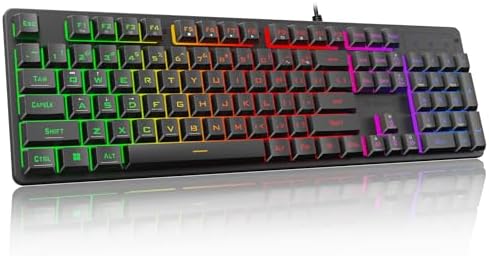
The Redragon K521 is a standalone wired keyboard with 104 keys, multimedia keys, and a rainbow LED backlight the listing describes as a different design from a traditional LED backlight effect. Its control layout is the simplest here: a one-touch button turns the lighting on and off, with a three-position breathing mode and a four-position brightness setting alongside it. Against the combos it gives up the included mouse, and against the AULA it gives up true mechanical switches, because its keys are designed for mechanical feeling and fast tapping rather than built on stated switches. The listing states 19-key anti-ghosting.
Pros
- One-touch lighting button with 3 breathing and 4 brightness positions
- 19-key anti-ghosting stated
- 104 keys with dedicated multimedia keys
Cons
- Mechanical-feeling keys only, no mechanical switch stated
- No mouse included, and no dimensions or weight stated
| Spec | From the listing |
|---|---|
| Color | Black |
| Size | K521 |
| Keys | 104 keys |
| Dimensions | The listing does not state it |
| Weight | The listing does not state it |
2. CHONCHOW Keyboard and Mouse Combo — Best for a high stated mouse DPI

The CHONCHOW set is a wired keyboard and mouse combo, not a keyboard alone, and both halves carry backlighting. The keyboard states 104 keys with 19 keys non-conflict, and its keys imitate a mechanical feeling rather than stating mechanical switches. The mouse carries the headline figure: 4800 DPI with 4 levels of 800, 1600, 2400, and 4800, plus 6 buttons, a 7-color RGB breathing backlight, and an anti-skid scroll wheel. Keyboard lighting stays simpler, with always-rainbow color, 3 brightness levels, and 2 modes.
Pros
- Mouse states 4800 DPI across 4 levels
- 104 keys with 19-key non-conflict stated
- Both devices carry adjustable backlighting
Cons
- Keys imitate a mechanical feeling, with no mechanical switch stated
- Keyboard backlight is rainbow-only with 2 modes
Skip it if you want switch choice or per-key color control, since this combo states neither.
| Spec | From the listing |
|---|---|
| Color | 910b |
| Size | 17.55.31.25 in |
| Length | 204.0 inches |
| Width | 60.48 inches |
| Height | 15.0 inches |
3. MageGee K1 Keyboard and Mouse Combo — Best white wired combo

The MageGee K1 is a wired keyboard and mouse combo finished in white, unlike the three black sets here. The keyboard is a full-size 104-key layout with F-keys and a number pad, floating keycaps the listing states are removable, and a high-and-low keycap layout the listing describes as ergonomic. Its RGB backlight states 8 colors and 5 modes, with multiple brightness levels and light speeds, and the listing states that a double-shot injection moulding process keeps the letters from fading. The mouse states 6 speed levels of 600, 800, 1200, 1600, 2400, and 3200, the widest stated spread here, though its top figure sits below the CHONCHOW mouse’s 4800 DPI.
Pros
- 8 backlight colors and 5 modes stated
- Mouse states 6 speed levels from 600 to 3200
- Removable floating keycaps and a number pad
Cons
- Wired only, with no wireless option stated
- White finish is the only color stated for this set
| Spec | From the listing |
|---|---|
| Color | K1 white |
| Length | 17.72 inches |
| Width | 8.7 inches |
| Height | 1.81 inches |
| Weight | 2.2 pounds |
4. RedThunder K10 Wireless Combo — Best wireless combo

The RedThunder K10 is the only wireless set here, a 2.4G combo built to balance work and games on one desk. Battery figures are stated for both halves: a 3000 mAh battery in the keyboard and an 800 mAh battery in the mouse, with the listing stating 8 hours of continuous use with the light on. Its backlight offers three groups of rainbow effects, 2 breathing modes, 3 static modes, and 4 brightness levels, covering the letters, logo, gaps, and surroundings. The keys are mechanical feel rather than stated mechanical switches, with anti-ghosting, a stated lifetime of 10,000,000 keystrokes, and ABS two-color injection molded keycaps.
Pros
- 2.4G wireless connection for both devices
- 3000 mAh keyboard and 800 mAh mouse batteries stated
- 3 static modes, 2 breathing modes, 4 brightness levels
Cons
- Both devices need recharging, unlike the wired options
- No dimensions stated for either device
Skip it if your desk never moves and you would rather not manage charging, since the wired sets remove that task.
| Spec | From the listing |
|---|---|
| Color | Black |
| Weight | 2.09 pounds |
| Connection | 2.4G wireless |
| Dimensions | The listing does not state it |
| Switch type | The listing does not state it |
5. AULA F2088 Typewriter Mechanical Keyboard — Best true mechanical keyboard
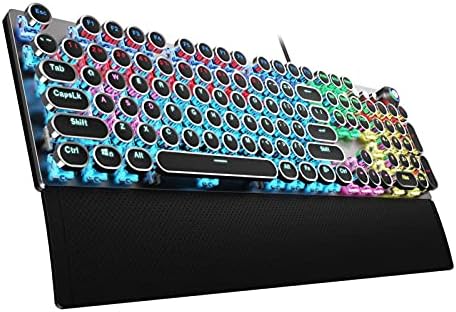
The AULA F2088 is the only keyboard here whose listing states real mechanical switches: blue switches with a quicker, springier response, a crisp click sound, and precise tactile feedback. Its look is equally distinct, with round double-shot keycaps in a retro typewriter style, an aluminium alloy panel with a matte finish, and a magnetic ABS wrist rest. Control runs through a dedicated knob and quick-access buttons covering media volume, backlight effect, and music play, pause, and switching. It states 104 keys with anti-ghosting and programmable keys.
Pros
- Mechanical blue switches stated, the only true mechanical set here
- Aluminium alloy panel with a magnetic wrist rest
- Control knob for media volume and backlight effect
Cons
- Round typewriter-style keycaps will not suit every typist
- Wired only, and it is a keyboard alone with no mouse
| Spec | From the listing | |
|---|---|---|
| Color | Black \ | Clicky Blue Switches |
| Size | Round Keycaps | |
| Length | 17.13 inches | |
| Width | 4.84 inches | |
| Height | 1.5 inches | |
| Weight | 2.25 pounds |
Shopping Checklist
Before you settle on one, work through the checks that separate them on stated figures rather than backlight color alone.
- Measure your desk first, then compare it with the stated lengths and widths where a listing gives them.
- Decide whether you need a mouse in the box, since three of the five are combos.
- Check whether the listing states mechanical switches or mechanical-feeling keys.
- Check stated connection and battery capacity if you are considering the wireless set.
- Compare your finalists side by side on anti-ghosting, backlight modes, and stated weight.
- Check the return window on the product page.
FAQ
Does mechanical feeling mean the same as a mechanical keyboard?
No. Four of these listings describe mechanical-feeling or mechanical-feel keys, a key design meant to imitate that response, while only the AULA F2088 states mechanical blue switches. Read the switch wording on each listing closely, because the two descriptions point to different constructions.
Which of these keyboards come with a mouse?
Three of the five are combos: the CHONCHOW set, the MageGee K1, and the RedThunder K10 each include a mouse with stated DPI or battery figures. The Redragon K521 and AULA F2088 are keyboards alone, which suits buyers who already own a mouse.
How much do backlight modes matter for everyday play?
They matter mostly for setup, not play itself. The MageGee K1 states 8 colors and 5 modes, the RedThunder K10 states 3 static and 2 breathing modes, and the Redragon K521 reduces control to one button. Pick the level of control you will use, then weigh switch type and connection more heavily.
Final Verdict
For buyers who want a gaming keyboard first and lighting second, the AULA F2088 is the strongest pick here, because it is the only one built on stated mechanical blue switches, and it adds a metal panel, a magnetic wrist rest, and a control knob. The RedThunder K10 is the clear choice for a wireless desk, with stated batteries of 3000 mAh and 800 mAh across the pair. The MageGee K1 and CHONCHOW combos suit buyers who need a mouse in the box, and the Redragon K521 suits anyone who wants a standalone wired board with the simplest backlight control here.
Prime covers fast, free delivery on eligible items. See whether a Prime free trial is available for your account.
Check Prime on Amazon →Related Guides
Product and ASIN Reference
| Product | ASIN | Buy |
|---|---|---|
| Redragon K521 | B0DRFGNWV1 | View on Amazon |
| CHONCHOW combo | B07DQW1KKB | View on Amazon |
| MageGee K1 | B07W6ZTMWP | View on Amazon |
| RedThunder K10 | B09BR46F63 | View on Amazon |
| AULA F2088 | B09DKQWTNC | View on Amazon |

Write Your Review
No reviews yet. Be the first to share your experience!