
Apartment doors split these five picks into two forms: pick a fingerprint knob lock from Evanshow, KLLOQUE or AIMNAPS when you want to replace a knob and keep entry simple, and pick the Philips deadbolt with handle when you want built-in WiFi, remote control and voice unlocking instead. Four of the five are knob-style locks; only the Philips is a deadbolt set, and only the Philips states WiFi.
That form choice drives everything else. The knob locks lean on fingerprint, app and key entry, with KLLOQUE app control limited to Bluetooth range. The Philips reaches further, with remote app control, real-time access history and PIN codes that can be permanent, one-time, periodic or recurring.
As an Amazon Associate, we earn from qualifying purchases.



Pick by Your Need
- Best overall: Evanshow Smart Door Lock with Knob. Fingerprint, keypad passcode, NFC card and mechanical key entry in one knob lock.
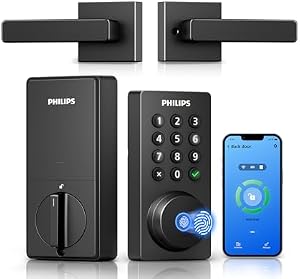
- Best for remote control: Philips WiFi Keypad Deadbolt with Handle. Built-in WiFi, remote app control and voice unlocking with no hub stated.
- Best for quick installation: AIMNAPS Smart Fingerprint Door Lock. No drilling or wiring stated, for doors between 1.18 and 1.97 inches thick.
- Best in matte black: KLLOQUE Fingerprint Door Knob, Matte Black. Fingerprint, app and key entry with a stated passage mode.
- Best in silver: KLLOQUE Fingerprint Door Knob, Silver. The same entry mix as the matte black KLLOQUE, in a silver finish.
Quick Answer
Start with the Evanshow for the widest entry mix — fingerprint, passcode, NFC card and key — or the Philips deadbolt for WiFi remote control and voice unlocking. Choose the AIMNAPS for a no-drilling install, and either KLLOQUE knob where Bluetooth-range app control is enough.
Comparison Table
| Product | Best for | Unlock methods | Connection | One trade-off | Buy |
|---|---|---|---|---|---|
| Evanshow Smart Door Lock with Knob | Widest entry mix | Fingerprint, keypad passcode, NFC card, key | Tuya app | An administrator fingerprint must be registered before first use | View on Amazon |
| KLLOQUE Fingerprint Door Knob, Matte Black | Matte black knob entry | Fingerprint, app, mechanical key | App within Bluetooth range | No remote control beyond Bluetooth range stated | View on Amazon |
| AIMNAPS Smart Fingerprint Door Lock | Quick installation | Fingerprint, code, key | App control not stated | Door thickness must fall between 1.18 and 1.97 inches | View on Amazon |
| Philips WiFi Keypad Deadbolt with Handle | Remote control | Fingerprint, PIN codes, voice, app | Built-in 2.4GHz WiFi, no hub | A deadbolt and handle set, not a simple knob swap | View on Amazon |
| KLLOQUE Fingerprint Door Knob, Silver | Silver knob entry | Fingerprint, app, mechanical key | App within Bluetooth range | No remote control beyond Bluetooth range stated | View on Amazon |
Decision Guide
Form comes first. The Evanshow, both KLLOQUE listings and the AIMNAPS are knob locks, so each replaces a door knob and suits a bedroom, front door or apartment door where a knob is already fitted. The Philips is a keypad deadbolt with a handle, a larger set aimed at a front door, and it is the only one of the five built around a deadbolt rather than a knob.
Connection is the second fork. The Philips states built-in WiFi on a 2.4GHz network with no hub required, plus remote lock and unlock, code and fingerprint management, status checks and real-time access history through its app. The KLLOQUE listings state app control within Bluetooth range. The Evanshow works through the Tuya app, with permanent and temporary access, entry logs and a silent mode. The AIMNAPS states fingerprint, code and key entry, without stating an app connection.
Entry methods are the next fork. The Evanshow states four ways in: fingerprint, keypad passcode, NFC card and mechanical key. The Philips states fingerprint unlocking alongside permanent, one-time, periodic and recurring PIN codes, which suits guests and housekeepers where a code can be set to expire. Each KLLOQUE states fingerprint, app and key entry. The AIMNAPS states fingerprint, code and key, with recognition at 0.5 seconds.
Auto-lock wording differs. The Evanshow locks itself after a pre-set time; the AIMNAPS locks automatically when the door is closed. The Philips and KLLOQUE listings do not state an auto-lock timing in the same way, so readers who want a self-locking door should compare those two knob locks first.
Finish and size close the decision. Matte black is offered by the KLLOQUE knob and the Philips set, silver by the Evanshow and the silver KLLOQUE, and black by the AIMNAPS. If you want a short list of recommended fingerprint smart locks for apartments, narrow it by form first, then by whether remote control matters.
1. Evanshow Smart Door Lock with Knob — Best Overall

The Evanshow states the widest entry mix of the five: fingerprint, keypad passcode, NFC card and mechanical key, managed through the Tuya app. It measures 6.0 inches long, 8.0 inches wide and 2.8 inches high at 1.2 pounds, the lightest stated weight here, and states a USB port for emergency power.
Pros
- Four entry methods stated: fingerprint, passcode, NFC card and key
- App assigns permanent and temporary access and tracks entry logs
- Auto-lock secures the knob after a pre-set time
Cons
- An administrator fingerprint must be registered first, because any fingerprint can unlock the door until one is set
- Silent mode and log features depend on the Tuya app setup
| Spec | From the listing |
|---|---|
| Color | Silver 02 |
| Size | With APP |
| Length | 6.0 inches |
| Width | 8.0 inches |
| Height | 2.8 inches |
| Weight | 1.2 pounds |
The trade-off is breadth against one critical first step: four entry methods and temporary access, but the administrator fingerprint has to be registered before the lock is relied on.
2. KLLOQUE Fingerprint Door Knob Matte Black — Best in Matte Black

This KLLOQUE knob states fingerprint, app and mechanical key entry in matte black, at 9.0 inches long, 3.5 inches wide and 3.5 inches high and 1.63 pounds, the heaviest stated weight here. Its listing states a passage mode among its operating modes.
Pros
- Fingerprint, app and mechanical key entry stated
- Passage mode stated among the operating modes
- App sets fingerprints, checks access records and shares access with family
Cons
- App control should be within Bluetooth range, so remote control is not stated
- 9.0 inches long, tied for largest here with the silver KLLOQUE
| Spec | From the listing |
|---|---|
| Color | Matte Black |
| Size | 1 Piece |
| Length | 9.0 inches |
| Width | 3.5 inches |
| Height | 3.5 inches |
| Weight | 1.63 pounds |
The trade-off is mode choice against range: passage and other operating modes are stated, but app control stays within Bluetooth range rather than reaching the door from elsewhere.
3. AIMNAPS Smart Fingerprint Door Lock — Best for Quick Installation

The AIMNAPS states the clearest installation terms here: it fits doors between 1.18 and 1.97 inches thick, with no drilling or wiring required. Entry is by fingerprint, code or key, recognition is stated at 0.5 seconds, and the lock locks automatically when the door closes.
Pros
- No drilling or wiring stated for installation
- Fingerprint recognition stated at 0.5 seconds
- Auto-lock engages when the door closes
Cons
- Door thickness must fall between 1.18 and 1.97 inches
- No NFC card, voice or WiFi entry stated, unlike the Evanshow and Philips
| Spec | From the listing |
|---|---|
| Color | black 02 |
| Size | smart door lock |
| Length | 1.0 inches |
| Width | 1.0 inches |
| Height | 1.0 inches |
| Weight | The listing does not state it |
The trade-off is installation simplicity against connection: a knob that fits a stated thickness range with no wiring, but no remote app control is stated for it.
4. Philips WiFi Keypad Deadbolt with Handle — Best for Remote Control
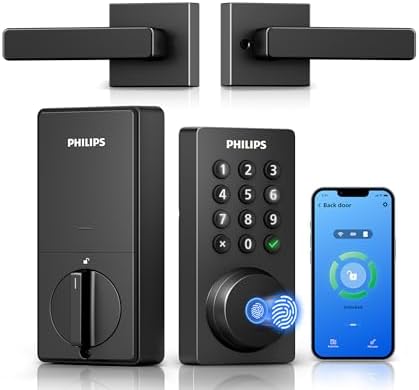
The Philips is the only deadbolt here, and the only lock stating WiFi: it connects directly to a 2.4GHz network with no hub required. The set measures 6.0 inches long, 2.2 inches wide and 1.5 inches high, and states voice commands through Alexa or Google Assistant.
Pros
- Built-in WiFi with remote lock, unlock and status checks stated
- Voice unlocking and locking through Alexa or Google Assistant stated
- Four PIN types stated: permanent, one-time, periodic and recurring
Cons
- WiFi connection is stated for 2.4GHz networks only
- A deadbolt and handle set is a bigger change than swapping a single knob
| Spec | From the listing |
|---|---|
| Color | Matte Black |
| Size | 2.2 inches x 6 inches x 1.5 inches |
| Length | 6.0 inches |
| Width | 2.2 inches |
| Height | 1.5 inches |
| Weight | The listing does not state it |
Skip it if the door only needs a knob replaced, because this is a full deadbolt and handle set built around WiFi control rather than a one-piece knob lock.
5. KLLOQUE Fingerprint Door Knob Silver — Best in Silver

This second KLLOQUE listing is a separate lock from the matte black version above, with its own ASIN and a silver finish, at the same stated size of 9.0 inches long, 3.5 inches wide and 3.5 inches high. It states the same entry mix — fingerprint, app and key — and the same passage mode.
Pros
- Silver finish for doors where matte black does not suit
- Fingerprint, app and mechanical key entry stated
- App sets fingerprints, checks access records and shares access with family
Cons
- App control should be within Bluetooth range, so remote control is not stated
- 9.0 inches long, tied for largest here with the matte black KLLOQUE
| Spec | From the listing |
|---|---|
| Color | Silver |
| Size | 1 Piece |
| Length | 9.0 inches |
| Width | 3.5 inches |
| Height | 3.5 inches |
| Weight | The listing does not state it |
The trade-off mirrors the matte black KLLOQUE: mode choice and shared app access, in silver, with app control still limited to Bluetooth range.
Shopping Checklist
- Measure the door and its existing fitting first: four of these replace a knob, while the Philips replaces a deadbolt and adds a handle.
- Check the stated door thickness where given: the AIMNAPS fits doors between 1.18 and 1.97 inches thick.
- Decide whether remote control matters: only the Philips states WiFi, and the KLLOQUE app control is stated within Bluetooth range.
- List who needs access and how: fingerprints, the Evanshow NFC card and passcode, or the Philips permanent, one-time, periodic and recurring PIN codes.
- Plan the first setup step: the Evanshow requires an administrator fingerprint to be registered before any other use.
- Check the product page for current details before ordering.
FAQ
Which of these locks can be controlled from outside the apartment?
Only the Philips states that level of control: built-in 2.4GHz WiFi, remote lock and unlock through its app, real-time access history and voice commands. The two KLLOQUE listings state app control within Bluetooth range, and the Evanshow works through the Tuya app for access assignments and entry logs.
What must be done before the Evanshow lock is used?
An administrator fingerprint must be registered before first use. The listing states that until an administrator is set, any fingerprint will be able to unlock the door, so that registration is the first setup step, not an optional extra.
How do the two KLLOQUE locks differ?
They are separate listings with separate ASINs. One is matte black and states a weight of 1.63 pounds; the other is silver and does not state a weight. Both state the same 9.0 by 3.5 by 3.5 inch size, fingerprint, app and key entry, and app control within Bluetooth range.
Final Verdict
The Evanshow is the broadest knob pick, with fingerprint, passcode, NFC card and key entry plus temporary app access, provided the administrator fingerprint is registered first. The Philips stands apart as the WiFi deadbolt. Between them, the AIMNAPS offers the simplest stated install, and the two KLLOQUE knobs cover matte black and silver with Bluetooth-range app control.
Prime covers fast, free delivery on eligible items. See whether a Prime free trial is available for your account.
Check Prime on Amazon →Types of Smart Locks
Smart locks are grouped mainly by unlock method and by what they're applied to - a full door lock or a smaller cabinet lock.
Keypad locks unlock with a PIN code, no app or key needed at the door itself. App/Bluetooth-controlled locks unlock from a smartphone, often with auto-lock and remote-access features. Fingerprint (biometric) locks add a physical scan as another unlock method. Smart cabinet locks apply the same app or code-based control to smaller cabinets or drawers rather than an entry door, often for child safety or securing a liquor or medicine cabinet.
Most smart locks retain a physical key or keypad backup for when the battery dies or the app/network connection fails, and checking that a given model has this fallback matters before relying on it as a home's main lock.
Frequently Asked Questions
What happens if a smart lock's battery dies?
Most retain a physical key or keypad backup for exactly this situation, and checking that a given model has this fallback matters before relying on it as a main entry lock.
What's a smart cabinet lock used for?
It applies the same app or code-based control used on smart door locks to smaller cabinets or drawers, often for child safety or securing a liquor or medicine cabinet.
Is a keypad lock less secure than an app-controlled lock?
Security depends more on build quality and encryption than the unlock method itself - both keypad and app-based locks can be equally secure or insecure depending on the specific model.
Related Guides
Product and ASIN Reference
| Product | ASIN | Buy |
|---|---|---|
| Evanshow Smart Door Lock with Knob | B0FCSNM6X3 | View on Amazon |
| KLLOQUE Fingerprint Door Knob, Matte Black | B0D1BR28N8 | View on Amazon |
| AIMNAPS Smart Fingerprint Door Lock | B0FX37K7ZX | View on Amazon |
| Philips WiFi Keypad Deadbolt with Handle | B0F61WG9F2 | View on Amazon |
| KLLOQUE Fingerprint Door Knob, Silver | B0D1KFGKNF | View on Amazon |


Write Your Review
No reviews yet. Be the first to share your experience!