
If you came here for a light, only one of these five products qualifies: the LUMAGNY handheld magnifier, which pairs a 2-inch lens with 2 LED bulbs. The other four are input devices — three mice and a keyboard and mouse combo — whose RGB glow styles the device itself, not your desk or page.
That split shapes every section below. The four input devices are compared on their listings’ terms: button counts, DPI figures, connections and stated RGB zones, presets or modes. The LUMAGNY is judged as a small lighted magnifier for close work.
As an Amazon Associate, we earn from qualifying purchases.



Pick by Your Need
- Best actual lighting: LUMAGNY LED Magnifier. The only lighting product here: 2 LED bulbs, two-way adjustable lighting.
- Best for gaming controls: Razer Basilisk V3. Wired gaming mouse with 11 buttons and 11 RGB zones — not a light.
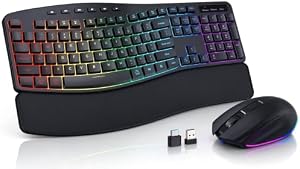
- Best for a full desk setup: footreal Keyboard and Mouse Combo. Wireless keyboard and mouse with 15 RGB backlight presets.
- Best for limited desk space: Nulea M508 Trackball Mouse. Thumb control keeps the mouse in place; RGB on the trackball.
- Best for a simple wired mouse: ONITOON Wired USB Mouse. Corded mouse with 4 DPI levels and gradient RGB.
Quick Answer
Buy the LUMAGNY magnifier if you need light itself: it is the only product built to illuminate, with 2 LED bulbs beside a 2x lens and a 5x diopter. The Razer, footreal, Nulea and ONITOON products are ergonomic input devices with RGB features, and each is a mismatch for ergonomic lighting.
Comparison Table
| Product | Best for | What it actually is | Key figures from the listing | Trade-off | Buy |
|---|---|---|---|---|---|
| Razer Basilisk V3 | Gaming controls | Wired gaming mouse — mismatch, not a lighting product | 11 programmable buttons, 11 RGB zones, 26K DPI sensor | Its RGB lights the mouse itself, not your workspace | View on Amazon |
| footreal Keyboard and Mouse Combo | Full desk setup | Wireless keyboard and mouse combo — mismatch | 15 RGB backlight presets, USB-A and USB-C receivers, 2.9 pounds | Heaviest item here; the backlight serves the keys, not the room | View on Amazon |
| Nulea M508 Trackball Mouse | Limited desk space | Wireless trackball mouse — mismatch | 3-device connection, 5 RGB trackball modes, thumb control | Stationary by design, which not every user wants | View on Amazon |
| ONITOON Wired USB Mouse | Simple wired control | Corded optical office mouse — mismatch | 7 buttons, 4 DPI levels from 1200 to 3600 | A cable ties it to one desk, and the RGB is decoration | View on Amazon |
| LUMAGNY LED Magnifier | Close work that needs light | Handheld LED lighted magnifier — the one match | 2 LED bulbs, 2x and 5x magnification, 2-inch lens | Lights only the small area under a 2-inch lens | View on Amazon |
Decision Guide
Start with the category question. Four of the five listings sell a way to move a cursor or type; one sells light. If your need is illumination for reading, inspection or close work, the LUMAGNY magnifier is the only candidate.
Among the input devices, connection is the first split. The Razer Basilisk V3 and the ONITOON are wired. The footreal combo connects wirelessly with both USB-A and USB-C receivers included, while the Nulea M508 switches between up to three devices over a 2.4GHz receiver, BT1 or BT2.
RGB is the second split, and the listings quantify it differently. Razer states 11 Chroma RGB zones and more than 16.8 million colors. The footreal keyboard states 15 dynamic lighting presets. The Nulea trackball states 5 modes — flowing water, breathing, solid-color, neon and off — switched with a physical knob. The ONITOON states gradient dynamic RGB with a low light mode, but gives no zone or preset count.
Size and weight separate them further. The footreal combo is heaviest at 2.9 pounds. The Razer weighs 0.22 pounds, the ONITOON 0.35 and the LUMAGNY 0.25.
Hand movement is the last split. The Nulea trackball stays in place while your thumb moves the cursor, suiting a crowded desk. The Razer adds a thumb rest; the footreal keyboard adds a wrist rest.
1. Razer Basilisk V3 Gaming Mouse — Best for Gaming Controls — Not a Light

This mouse is a mismatch for ergonomic lighting: it is a wired gaming mouse, and its Chroma RGB features the mouse body, not a desk or page. As a mouse, the listing is detailed: 11 programmable buttons, a hyperscroll tilt wheel that free-spins or switches to tactile mode, and a 26K DPI optical sensor. The shape is ergonomic, with a thumb rest, but none of that produces usable light beyond the mouse itself.
Pros
- 11 programmable buttons for macros and secondary functions
- 11 RGB zones, over 16.8 million colors
- Hyperscroll tilt wheel with free-spin and tactile modes
Cons
- A gaming mouse, not a lighting product
- Wired only; no wireless connection stated
| Spec | From the listing |
|---|---|
| Color | Black |
| Length | 2.96 inches |
| Width | 5.12 inches |
| Height | 1.67 inches |
| Weight | 0.22 pounds |
2. footreal Wireless Keyboard and Mouse Combo — Best for a Full Desk Setup — Not a Light
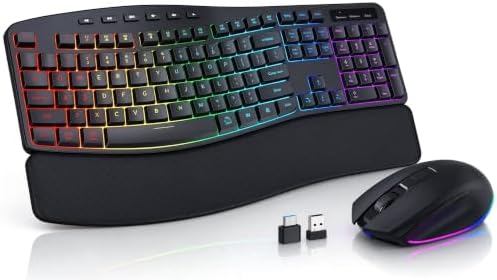
This combo is a mismatch for ergonomic lighting: it is a keyboard and mouse set, and its RGB backlight styles the keys rather than lighting a workspace. As a desk set, it covers ground the single mice do not: a wave-shaped keyboard with a built-in soft perforated leather wrist rest, backlit letters, and 15 dynamic lighting presets including breathing and wave patterns. It connects through USB-A and USB-C receivers, and the listing states silent key presses and quiet mouse clicks. At 2.9 pounds it is by far the heaviest item here.
Pros
- Keyboard and mouse in one wireless set with two receiver types
- 15 RGB backlight presets with backlit letters
- Built-in wrist rest on a wave-shaped keyboard
Cons
- A keyboard combo, not a lighting product
- 2.9 pounds, the heaviest of the five
| Spec | From the listing |
|---|---|
| Color | Black |
| Weight | 2.9 pounds |
| Dimensions | The listing does not state it |
| Mouse DPI levels | The listing does not state it |
3. Nulea M508 Wireless Trackball Mouse — Best for Limited Desk Space — Not a Ligh

This trackball mouse is a mismatch for ergonomic lighting: it is an input device, and the RGB sits in its rollerball rather than in any lamp or fixture. Its ergonomic idea differs from the other mice: the sculpted right-hand shape stays in place while your thumb moves the cursor, reducing wrist and arm movement, per the listing. The trackball’s RGB offers 5 modes, from flowing water and breathing to solid-color, neon and off, switched by a physical knob without software. It connects to up to 3 devices through a 2.4GHz USB receiver, BT1 or BT2. Skip it if you prefer sliding a mouse across the desk; a stationary trackball changes how cursor movement works.
Pros
- Thumb control keeps the mouse stationary on small desks
- Connects to up to 3 devices across receiver and two Bluetooth channels
- 5 RGB trackball modes switched by a physical knob
Cons
- A trackball mouse, not a lighting product
- Weight not stated in the listing
| Spec | From the listing |
|---|---|
| Color | A-Black |
| Weight | The listing does not state it |
| Dimensions | The listing does not state it |
| Connection | 2.4GHz USB receiver, BT1, BT2 |
4. ONITOON Wired USB Mouse — Best Simple Wired Mouse — Not a Light

This corded mouse is a mismatch for ergonomic lighting: its gradient dynamic RGB lights up the mouse shell, and it produces no light for reading or working by. The listing is specific: an optical sensor with 4 adjustable DPI levels at 1200, 1800, 2400 and 3600, and 7 buttons counting the left, right, forward, back, DPI controls and scroll wheel. Holding the DPI- button for 3 seconds switches it into a low light mode. The honeycomb shell is stated to reduce heat buildup, with a grip described as an ergonomic fit for the palm.
Pros
- 4 DPI levels from 1200 to 3600 for different tasks
- 7 buttons including forward and back controls
- Low light mode via a 3-second hold on the DPI- button
Cons
- A wired mouse, not a lighting product
- Corded connection only; no wireless option stated
| Spec | From the listing |
|---|---|
| Color | White |
| Length | 5.12 inches |
| Width | 2.95 inches |
| Height | 0.04 inches |
| Weight | 0.35 pounds |
5. LUMAGNY LED Handheld Magnifier — Best Actual Lighting Pick

The LUMAGNY is the one product here that matches ergonomic lighting, because it is a light: a handheld magnifier with 2 LED bulbs built in. The lens is a 2-inch (5.1 cm) distortion-free aspheric lens giving 2x magnification by default and 5x through an added diopter. The 2 LED bulbs offer two-way adjustable lighting, run independently or simultaneously from a side button. The unit is 7.5 inches (19 cm) long and weighs 0.25 pounds, with a wrist strap and comfort grip handle stated. Its limit is reach: the light covers the area under a 2-inch lens, not a desk or a room.
Pros
- The only true lighting product of the five, with 2 LED bulbs
- Two-way adjustable lighting, run independently or together
- 2x magnification with a 5x diopter in a 2-inch lens
Cons
- Illuminates only the small area under the lens
- Handheld only; no stand or mount stated
| Spec | From the listing |
|---|---|
| Color | White Handle – White Rim (2x / 5x) |
| Size | 2-inch |
| Overall length | 7.5 inches (19 cm) |
| Light source | 2 LED bulbs, two-way adjustable |
| Weight | 0.25 pounds |
Shopping Checklist
- Decide first whether you need light or an input device: only the LUMAGNY magnifier here produces light.
- Compare stated controls: 11 programmable buttons (Razer), 7 buttons (ONITOON), thumb control (Nulea).
- Check connections: wired for the Razer and ONITOON, USB-A and USB-C receivers for the footreal combo, 3-device switching on the Nulea.
- Compare RGB figures as stated: 11 zones (Razer), 15 presets (footreal keyboard), 5 modes (Nulea trackball).
- Compare stated weights: 0.22 pounds Razer, 0.25 LUMAGNY, 0.35 ONITOON, 2.9 footreal combo.
- Check the product page for current details before ordering.
FAQ
Which of these five products is actually a lighting product?
Only the LUMAGNY magnifier. It has 2 LED bulbs with two-way adjustable lighting beside a 2-inch lens. The other four are mice or a keyboard and mouse combo; their RGB lights the devices themselves.
Does RGB on a mouse or keyboard light a workspace?
Not in any way these listings describe. The Razer states 11 RGB zones reacting with over 150 integrated games, the footreal keyboard states 15 backlight presets, and the Nulea states 5 trackball modes. That light stays on the device; none of the four listings states a brightness figure for lighting a desk or page.
Which input device suits a small or crowded desk?
The Nulea M508 is built for that case: the mouse stays in place while your thumb moves the cursor, and it connects to up to 3 devices through a 2.4GHz receiver, BT1 or BT2. The footreal combo goes the other way at 2.9 pounds, adding a full keyboard with a wrist rest.
Final Verdict
The honest answer for this group is short: the LUMAGNY LED magnifier is the only light, suiting close work under a 2-inch lens at 2x or 5x magnification. The other four are input devices with RGB styling: Razer for gaming controls, footreal for a full wireless desk set, Nulea for stationary thumb control, ONITOON for simple wired use. Choose the LUMAGNY for light; choose among the rest only for a mouse or keyboard.
Prime covers fast, free delivery on eligible items. See whether a Prime free trial is available for your account.
Check Prime on Amazon →Related Guides
Product and ASIN Reference
| Product | ASIN | Buy |
|---|---|---|
| Razer Basilisk V3 RGB Wired Ergonomic Gaming Mouse | B09C13PZX7 | View on Amazon |
| footreal Ergonomic Wireless Keyboard and Mouse Combo | B0HHN3535R | View on Amazon |
| Nulea M508 Wireless Trackball Mouse | B0H7J71BDP | View on Amazon |
| ONITOON Wired USB Mouse with RGB Lighting | B0DSSYC2R7 | View on Amazon |
| LUMAGNY Handheld LED Magnifier 2X / 5X | B01AGT656W | View on Amazon |





Write Your Review
No reviews yet. Be the first to share your experience!