
Only two of these five listings are true dual-band router accessories: the TAODAN antenna pair and the OkeMeeo wall mount for the eero 7. The other three, the eero 7 router pack, the Mini Mesh router and the TP-Link travel router, are full routers rather than add-ons, so each is a strict mismatch for this keyword, flagged that way throughout.
If you are shopping for essential accessories for dual-band routers, start with what the add-on actually does: the antennas extend a router that has RP-SMA or SMA antenna ports, and the mount lifts one specific router, the eero 7, onto a wall. Everything else here replaces a router instead of accessorizing one.
As an Amazon Associate, we earn from qualifying purchases.


Pick by Your Need
- Best for replacing worn router antennas: TAODAN Antenna Pair. Dual-band antennas with RP-SMA and SMA male connectors, sold as a pair.
- Best for wall-mounting an eero 7: OkeMeeo Wall Mount. A bracket molded for the eero 7, with screw or adhesive fitting.
- Best for a whole new mesh network: eero 7 3-Pack. A strict mismatch here: a full Wi-Fi 7 router set, not an accessory.
- Best for adding a Starlink mesh node: Mini Mesh Router. A strict mismatch here: a compact router, not an accessory.
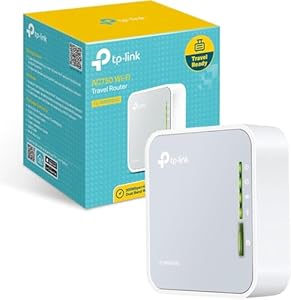
- Best for hotel and travel Wi-Fi: TP-Link Travel Router. A strict mismatch here: a portable router, not an accessory.
Quick Answer
Buy the TAODAN antennas if your router has the matching antenna connectors, and the OkeMeeo mount if you own an eero 7 and want it off the shelf. Treat the other three listings as strict mismatches: the eero 7 pack, the Mini Mesh router and the TP-Link travel router are routers themselves, not add-ons. Among essential accessories for dual-band routers, only the antenna pair and the mount do an accessory’s job.
Comparison Table
| Product | Type stated | Dual-band detail | Size stated | Weight |
|---|---|---|---|---|
| eero 7 3-Pack | Mesh Wi-Fi 7 router (strict mismatch) | Dual-band in the product name | 5.12 x 2.52 x 5.12 inches | 1.34 pounds |
| Mini Mesh Router | Compact mesh router (strict mismatch) | 2.4GHz and 5GHz stated | 3.5 x 3.5 x 1.5 inches | 0.2 pounds |
| TAODAN Antenna Pair | Router antennas | 2.4/5/5.8GHz bands stated | not stated | not stated |
| OkeMeeo Wall Mount | Router wall bracket | Molded for the dual-band eero 7 | not stated | 0.2 pounds |
| TP-Link Travel Router | Travel router (strict mismatch) | Dual Band AC750 stated | 2.64 x 2.91 x 0.87 inches | 0.6 pounds |
Decision Guide
Start with the type test, because it decides this whole list. An accessory adds to a router you already own: it swaps an antenna or holds the router on a wall. A router, however compact or mesh-capable, is the main device. By that test the TAODAN antennas and the OkeMeeo mount are the only matches here, and the other three listings are strict mismatches, each flagged again in its own section below.
For the antennas, fit is the deciding figure. The TAODAN listing states frequency ranges of 2400-2500MHz and 5150-5850MHz, covering the 2.4GHz and 5GHz bands, and RP-SMA and SMA male connectors with a hole fitting. Your router needs one of those connector types; the listing gives no size or weight figures, so settle the physical fit on the product page.
For the mount, model fit is everything. The OkeMeeo bracket is molded precisely for the eero 7 and fits that router only, per its listing; it installs with the included screws or with adhesive on the back, and it suits walls, placement behind a TV, or living spaces. If your router is any other model, this mount is the wrong accessory.
Read the three strict mismatches on their own terms only if a router is what you actually need. The eero 7 pack states coverage up to 6,000 square feet and support for 120+ devices; the Mini Mesh router states compatibility with four Starlink generations; the TP-Link states six modes in a 0.6 pound body. Those are router-shopping figures, present only so the mismatch stays plain.
1. eero 7 Dual-Band Mesh Wi-Fi 7 Router 3-Pack — Best strict Mismatch — A Full Mesh Route

The eero 7 listing states a Wi-Fi 7 mesh router sold as a 3-pack, with support for internet plans up to 2.5 Gbps, two auto-sensing 2.5 GbE ports and wireless speeds up to 1.8 Gbps. Three units state coverage up to 6,000 square feet and support for 120+ devices. It is the main network device, not an add-on, so it is a strict mismatch for an accessories search.
Pros
- Stated coverage up to 6,000 square feet across the three units
- Two auto-sensing 2.5 GbE ports and stated wireless speeds up to 1.8 Gbps
- Stated support for 120+ connected devices
Cons
- The TAODAN antennas add on to a router you own; this pack replaces the router itself
- The OkeMeeo mount is built for this router, marking it as the device, not the accessory
| Spec | From the listing |
|---|---|
| Color | WHITE |
| Length | 5.12 inches |
| Width | 2.52 inches |
| Height | 5.12 inches |
| Weight | 1.34 pounds |
2. Mini Mesh WiFi Router for Starlink Systems — Best strict Mismatch — A Full Router

The Mini Mesh listing states a compact dual-band router supporting 2.4GHz and 5GHz WiFi, built to expand a compatible mesh setup and stated as compatible with Starlink Gen 2, Gen 3, Gen 4 and Mini systems. A router that joins a network as a node is still a router, not an accessory, so this is a strict mismatch here.
Pros
- Stated compatibility with four Starlink system generations
- Dual-band 2.4GHz and 5GHz support stated in the facts
- A stated footprint of 3.5 by 3.5 inches, and joint-lightest at 0.2 pounds
Cons
- The TAODAN pair upgrades an existing router’s antennas; this unit asks you to add another router instead
- Its listing states that connection methods and required accessories vary by Starlink system, so the setup differs by generation
| Spec | From the listing |
|---|---|
| Color | White |
| Length | 3.5 inches |
| Width | 3.5 inches |
| Height | 1.5 inches |
| Weight | 0.2 pounds |
3. TAODAN Dual Band WiFi Antenna Pair — Best True Antenna Accessory
The TAODAN listing states a pair of dual band antennas covering 2400-2500MHz and 5150-5850MHz, the ranges that carry the 2.4GHz and 5GHz bands, with RP-SMA and SMA male connectors and a hole fitting. The facts state the pair is for use with routers and WiFi routers. This is the one antenna accessory in the group, and it is a full match.
Pros
- Both bands covered by the stated frequency ranges, 2.4GHz and 5GHz
- Two connector types stated, RP-SMA and SMA male, widening the fit
- Sold as a pair, suiting routers with two antenna ports
Cons
- The OkeMeeo mount states a 0.2 pound weight; this listing gives no weight figure at all
- The TP-Link states 2.64×2.91×0.87 inches; this listing gives no dimensions, so check fit on the product page
| Spec | From the listing |
|---|---|
| Frequency | 2400-2500MHz / 5150-5850MHz |
| Connector | RP-SMA / SMA male, with hole |
| Stated use | Routers, WiFi routers |
| Dimensions | The listing does not state it |
| Weight | The listing does not state it |
4. OkeMeeo eero 7 Wall Mount Bracket — Best Wall Mount Accessory
The OkeMeeo listing states a wall mount bracket molded precisely for the eero 7 dual-band mesh Wi-Fi 7 router, giving that router secure support on a wall, behind a TV, or in living spaces. Installation runs two ways: the included screws, or adhesive on the back. The router itself is not included. As a bracket built for one dual-band router, it is a full match.
Pros
- Precisely molded fit stated for the eero 7, and for that router only
- Two installation routes stated: included screws or back adhesive
- Joint-lightest stated weight here at 0.2 pounds, level with the Mini Mesh unit
Cons
- The TAODAN antennas fit any router with matching ports; this mount fits exactly one router model
- The Mini Mesh states 3.5×3.5×1.5 inches; this listing gives no dimensions; confirm clearance on the product page
| Spec | From the listing |
|---|---|
| Fit | eero 7 dual-band router |
| Pack size | 1 Pack |
| Installation | Screws or adhesive |
| Weight | 0.2 pounds |
| Dimensions | The listing does not state it |
5. TP-Link WiFi Travel Router AC750 — Best strict Mismatch — A Travel Router
The TP-Link listing states a travel router with Dual Band AC750 WiFi, sized to pack and take on the road and creating a WiFi network via Ethernet. One switch selects among Router, Hotspot, Bridge, Range Extender, Access Point and Client modes, and power runs through a Micro USB port. It is a complete router in a small body, so it is a strict mismatch for an accessories list.
Pros
- Six stated operating modes selected by one switch
- Dual Band AC750 WiFi stated in the facts
- Flexible Micro USB power stated, from an adapter, charger or laptop
Cons
- The TAODAN antennas and OkeMeeo mount support a router you keep; this unit becomes the router instead
- Its stated height of 0.87 inches is the slimmest here, a router figure that adds nothing to an existing setup
| Spec | From the listing |
|---|---|
| Color | White |
| Size | AC750 |
| Length | 2.64 inches |
| Width | 2.91 inches |
| Height | 0.87 inches |
| Weight | 0.6 pounds |
Buying Checklist
- Check the product type first: only the TAODAN antennas and the OkeMeeo mount are accessories; the other three listings are full routers and strict mismatches.
- Check stated fit before anything else: RP-SMA or SMA antenna ports for the antennas, and an eero 7 router for the mount.
- Check stated dimensions and weight where given, and settle any missing figure on the product page.
- Check exactly what is included: the mount’s screws are stated as included; the router it holds is not.
- Check the return window on the product page, and compare 2 to 3 finalists side by side.
FAQ
How do I know whether a listing is a router accessory or a router?
Look at what the product does on its own. An accessory, like the antennas or the wall mount here, only works alongside a router you already own. A listing that creates or joins a network by itself, with its own bands, modes or coverage figures, is a router, however small.
What should I check before buying replacement router antennas?
Check the connector type and the frequency ranges. The antennas here state RP-SMA and SMA male connectors and ranges covering the 2.4GHz and 5GHz bands; your router’s ports must match the connector, and its bands must fall inside the stated ranges.
Does a wall mount fit any dual-band router?
Usually it fits one model only. The mount here is molded for the eero 7 and states that fit plainly, so confirm your exact router model against the stated fit on the product page.
Final Verdict
For essential accessories for dual-band routers, the honest shortlist is two items long: the TAODAN antenna pair for routers with RP-SMA or SMA ports, and the OkeMeeo mount for eero 7 owners. The other three listings are strict mismatches, full routers rather than add-ons, so buy one of those only when a new router is the real goal.
Prime covers fast, free delivery on eligible items. See whether a Prime free trial is available for your account.
Check Prime on Amazon →Related Guides
Product and ASIN Reference
| Product | ASIN | Grade |
|---|---|---|
| eero 7 3-Pack | B0D955ZMSR | Strict mismatch: full mesh Wi-Fi 7 router, not an accessory |
| Mini Mesh Router | B0HQM8MM1Q | Strict mismatch: compact mesh router, not an accessory |
| TAODAN Antenna Pair | B0FVT21WFF | Match: dual-band router antennas with stated connectors |
| OkeMeeo Wall Mount | B0F9FMTMK6 | Match: wall bracket molded for the dual-band eero 7 |
| TP-Link Travel Router | B01N5RCZQH | Strict mismatch: travel router, not an accessory |

Write Your Review
No reviews yet. Be the first to share your experience!